Chapter 11
3D scenes and your final map
Accompanies Module 11 · 3D Scenes and a Final Map
Why this matters
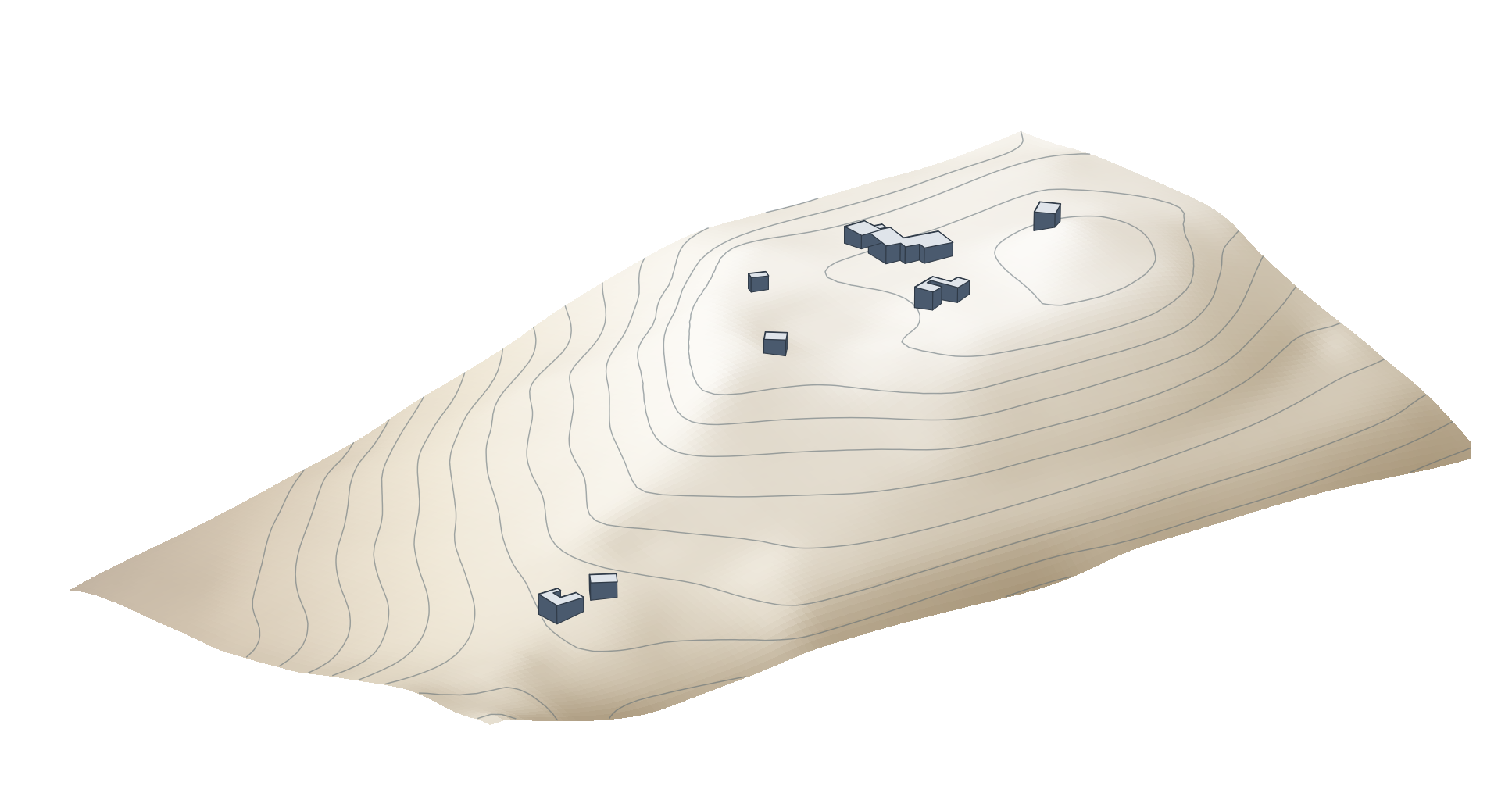
Every map in this book so far has been flat. A scene draws the same layers in three dimensions: a ground surface built from an elevation model, with flat layers laid over it and features raised into blocks. The picture above shows the Haleakalā summit on Maui, drawn from the state's 10 m elevation model, with its eight federal building footprints raised 10 m each. The chapter ends, as the last lesson of the course does, with a checklist for a finished map of your own.
You should be able to explain
- why a scene's ground is a DEM, and why a 10 m cell can give a sharp summit a lower height than it has
- why Max Height suits a building on a slope, and why one height typed for every building is a guess
- why the map is finished before the layout, and why a layout is judged by its exported image
Two kinds of scene
A scene is a map drawn in three dimensions. ArcGIS Pro has two kinds. A global scene shows the whole round Earth. It suits large areas where the curvature of the planet matters, such as a flight route across an ocean, the track of a hurricane or a continent seen from space. A local scene shows a flat piece of the world in a projected coordinate system. It suits a site, a town or a mountain, where the curvature does not matter.
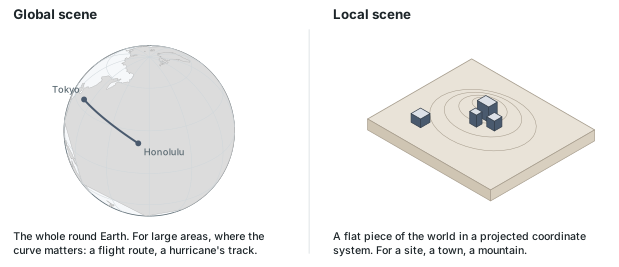
The difference is the same as the one Chapter 3 described between a globe and a projected map. A global scene keeps latitude and longitude on a sphere and is never flattened. A local scene is a projected map with heights added, so everything Chapter 3 says about choosing a projected coordinate system for a place applies to it.
A scene is usually made from an existing map. Converting a map to a local scene makes a new item beside it (named after the map with "_3D" on the end); the flat map is not changed. The scene's Contents then sorts its layers under three headings: 3D Layers for things that stand up off the ground, 2D Layers for flat things drawn on the ground, and Elevation Surfaces, where a surface called Ground contains the elevation of the ground. A newly converted scene has everything under 2D Layers and one source under Ground.
In the pane
Module 11 lesson 1 builds a fresh map of the Haleakalā summit with two layers added by URL, the state's imagery and the federal building footprints, then converts it to a local scene. The lesson explains global scenes but does not use one. You look at which heading each layer is listed under in Contents, and Waldo reads the scene to confirm that its ground is Esri's world DEM.
The ground is a DEM
Every scene is drawn on an elevation surface, the ground, and the ground is a DEM: the grid of elevations from Chapter 8, one height for every cell. A new local scene gets Esri's elevation model of the whole world as its ground unless another is chosen. The flat layers are then laid over that surface, so imagery that was flat on the map has slopes in the scene.
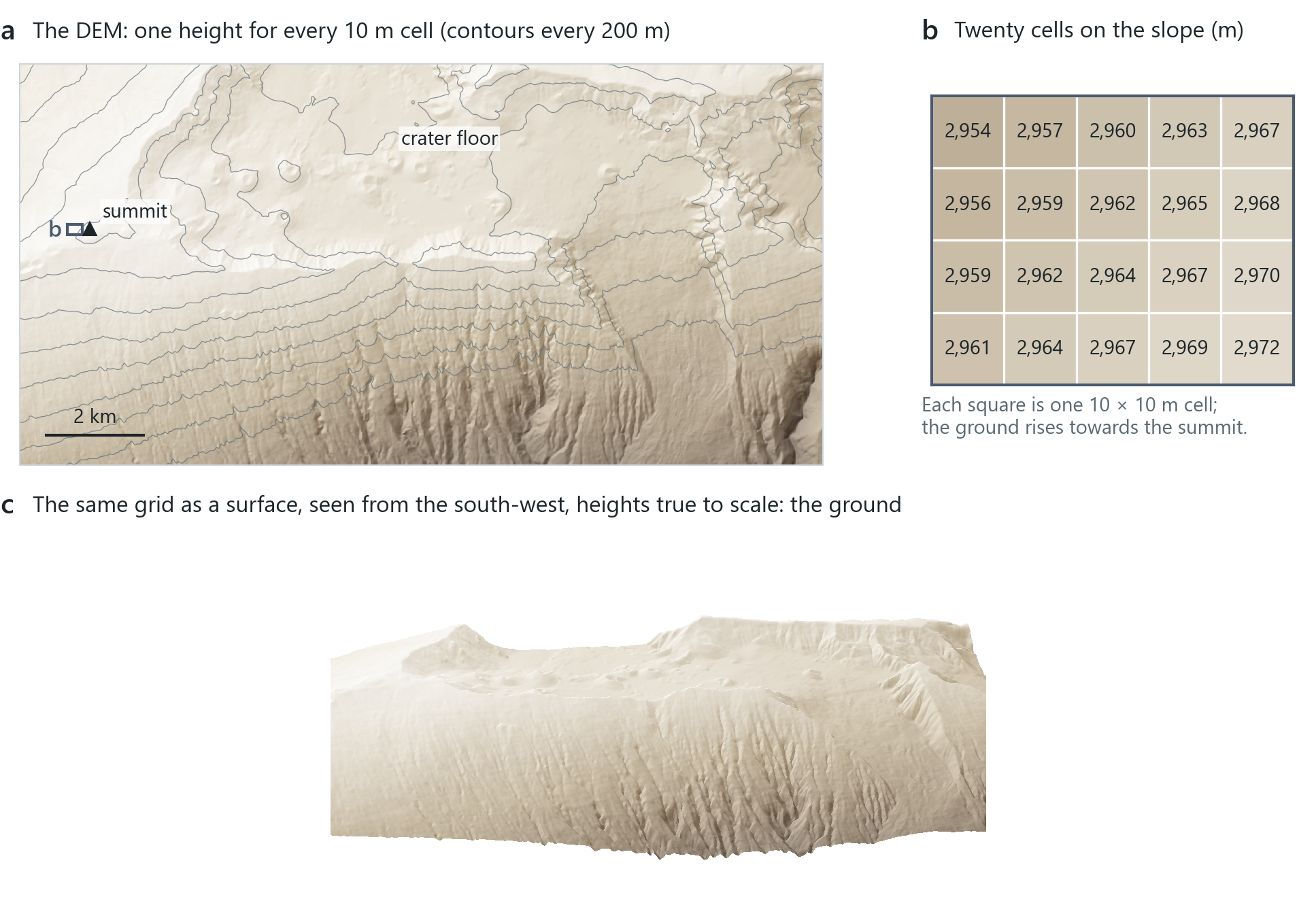
A scene shows the height of the ground under the pointer, so you can read the elevation wherever you point. At the observatory buildings the state's DEM gives about 3,033 m. The highest cell of that grid is 3,051 m, a little below the 3,055 m of Puʻu ʻUlaʻula, the summit itself. A 10 m cell holds one height for a hundred square metres, so a sharp peak can appear lower than it is, and a height also depends on the vertical datum it is measured from (the surface that the height is measured above). Agreement between the scene's own ground and the state's DEM is a consistency check rather than independent proof, because Esri's world elevation model uses USGS data for Hawaii, as the state's layer does, so the two are related.
East of the summit the ground falls away into Haleakalā crater, a valley about 11 km long. Along the row of cells through the buildings its floor lies at about 2,200 m, some 800 m below the rim, dotted with cinder cones.
A ground surface can be stretched upwards with vertical exaggeration: a factor of 2 doubles every height. In gently rolling terrain, a small exaggeration makes the hills easier to see. A 3,000 m volcano does not need it, and an exaggerated view would mislead anyone judging its slopes, so the summit is shown at a factor of 1.
Moving in a scene
On a flat map you pan and zoom. In a scene you also move a camera: a position in three dimensions, with a height above the ground, a pitch (how far it looks down from the horizon) and a heading (the compass direction it faces).
A heading is an angle counted clockwise from north: 0° is north, 90° east, 180° south and 270° west, so a heading of 78° faces east-north-east, a little north of east. ArcGIS Pro shows the numbers in a small Camera panel (View tab, Navigation group, beside the Navigator button): the camera's position, its heading, pitch and roll. Without the panel, you can use the on-screen navigator: its N always points north, so when you face east it points to your left.
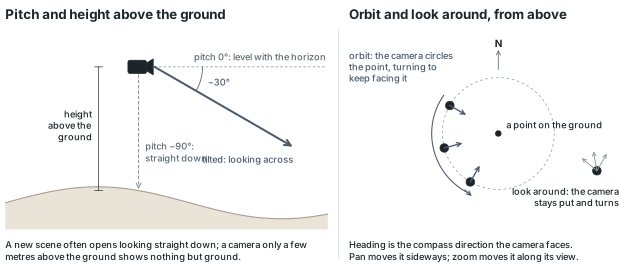
Pan and zoom still work as on a map. Tilt changes the pitch, rotate changes the heading, orbit circles the camera round a point so a building can be seen from every side, and look around keeps the camera where it is and turns it, like standing on the summit and turning your head. The mouse, the keyboard and a small on-screen navigator in the corner of the view all do the same things; which one you use depends on your preference and your hardware.
Two situations commonly confuse new users. A converted scene often opens looking straight down, so it looks exactly like the flat map until you tilt it. And if the camera ends up only a few metres above the ground, the view is a patch of brown or grey with nothing recognisable in it: zoom out until the features appear.
In the pane
Module 11 lesson 1 reads the summit's elevation off the scene, and Waldo checks your number against the state's USGS 10 m DEM (about 3,033 m). Then you tilt, turn and zoom out towards the crater; Waldo reads the camera's pitch to confirm the view is tilted. To face the crater you turn east, using the Camera panel's heading, and if you are unsure which way you are looking, Waldo reads the camera's heading and says it in words ("facing east-north-east, 78°"). The lesson points out vertical exaggeration but does not use it.
Draping and extruding
A scene holds two kinds of layer. A flat layer is draped: drawn on the ground surface so that it follows every rise and dip. The imagery and the outlines of the buildings are draped when a map is converted, and a draped layer stays under 2D Layers.
A layer can also be extruded: each feature is pushed up by a height into a solid, a polygon into a block, a line into a wall, a point into a column. Extrusion exists only in scenes and changes only how the layer is drawn; no value in the data changes. Pro moves an extruded layer from 2D Layers to 3D Layers automatically.
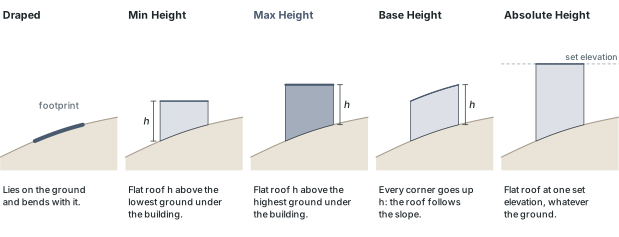
On flat ground the three relative types give the same block. Absolute Height differs everywhere, because it sets an elevation rather than a height above the ground: a top at 10 m would be 3,000 m below the summit. On a slope the three relative types differ, and choosing one is a decision about how the building meets the ground. Min Height puts a flat roof h above the lowest ground under the feature, so the uphill wall is shorter than h. Max Height puts it h above the highest ground, so no wall is shorter than h; it is the sensible choice for buildings on a slope, and the one the lesson uses. Base Height raises every corner by h, so the top follows the slope. Absolute Height puts the top at one set elevation, whatever the ground.
The summit's buildings
The buildings in the opening picture come from USA Structures, a national set of building footprints traced by Oak Ridge National Laboratory for FEMA. At the summit it holds eight footprints, from 83 m² to 1,121 m², all traced automatically from a 2017 satellite image. The layer has a field for each building's height, and at the summit it is empty on all eight.
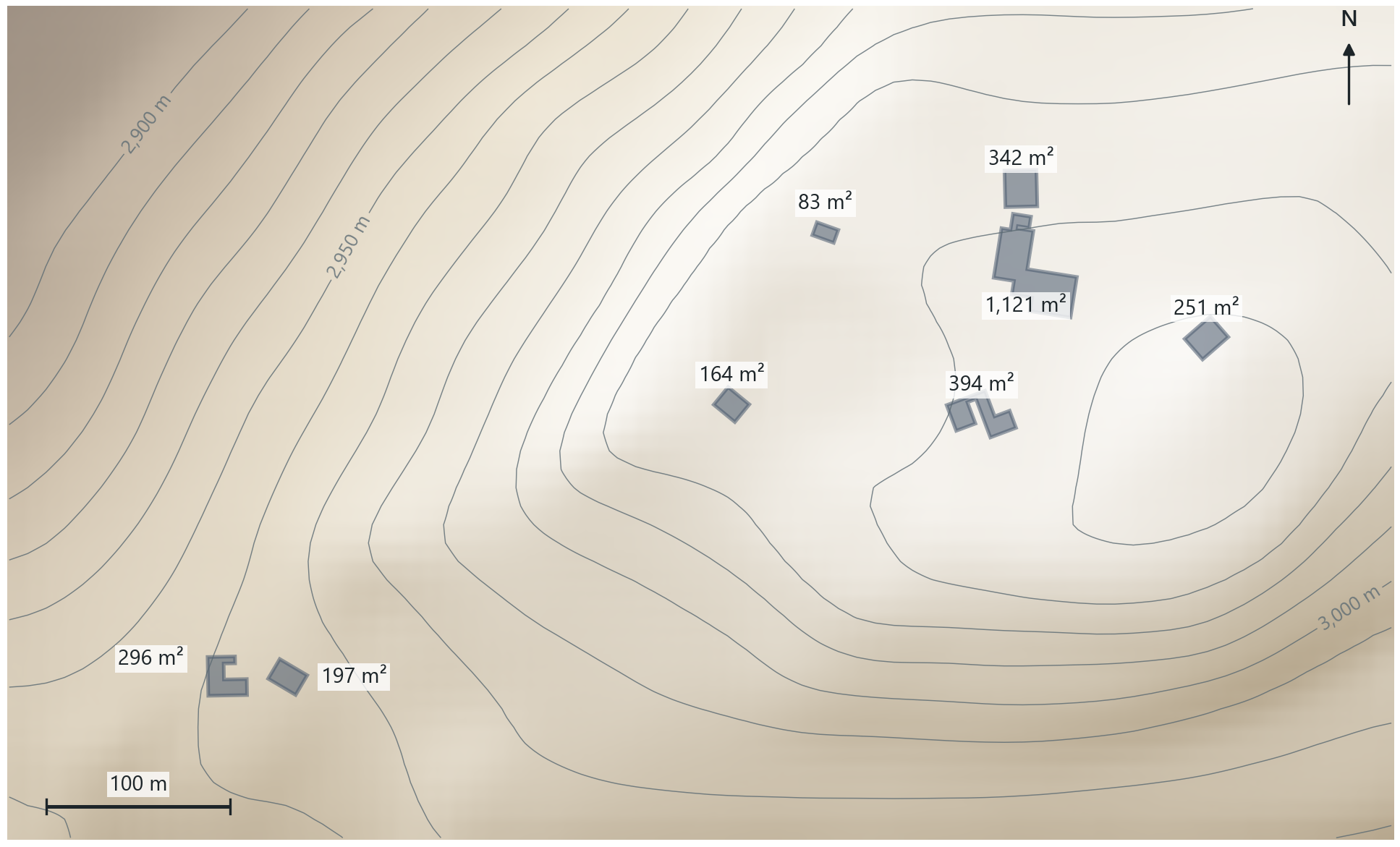
The traced footprints are accurate enough to extrude, but they are not survey data. When they are drawn over different imagery, the outlines are a few metres off the roofs, and some of the summit's smaller structures, dishes and sheds, have no footprint at all. These are the limits of an automated national dataset traced from one image, and on a summit this steep every image is shifted a little.
The ground under a footprint is rarely level. Under the eight summit buildings it falls between 0.9 m and 7.1 m from one side to the other. The largest footprint stands on ground from 3,028.7 m to 3,035.8 m, so with Max Height and 10 m its roof is at 3,045.8 m: 10 m above its uphill corner and about 17 m above its downhill one. With Min Height the same roof would be 10 m above the downhill corner and barely 3 m above the uphill one.
Reading the result
- The question: how do the summit's buildings stand on the mountain?
- The representation: eight traced footprints extruded with Max Height by a single estimated height of 10 m.
- What it shows: where the buildings stand and how the ground falls under them.
- What it cannot establish: any building's real height; the height field is empty at the summit.
In the pane
Module 11 lesson 2 looks at the draped layers first, then opens a footprint's pop-up to show that the height field is empty. You extrude all eight footprints with Max Height and a single value of 10 m, watch the layer move into 3D Layers, orbit and look around, and export a picture of the view. Waldo reads the scene to confirm the footprints are extruded, and the project folder to confirm the picture is there.
One number or a field
A height can come from a single value typed for every feature or from a field. When the data records each building's height, in a height field or as a count of storeys that can be multiplied by a storey height, extruding by that field gives every building its own height. When it does not, as at the summit, one value for all is the usual choice, and that value is a guess (leaving the footprints draped is the other honest choice): the large telescope domes are almost certainly taller than 10 m. A survey, a lidar surface or a storeys field would show by how much.
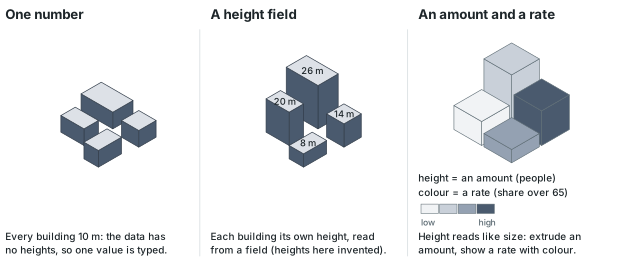
Extrusion can also show a thematic value, turning a choropleth map into a set of prisms. Height then works as a visual variable in the same way as size: readers see a taller prism as more of something. The lecture therefore advises extruding by a count, an amount of something, and showing a rate or a ratio with colour, as Chapter 4 does on flat maps. One caution applies: readers judge a prism's bulk as well as its height, so a large area with a moderate value can look like more than a small area with a high one. Module 11 does not build such maps; the idea is included so that you can interpret one.
Rule of thumb
Extrude by a field when the data holds heights. When it does not, one value for everything is fine, but say that it is a guess, on the picture itself and not only in the text.
Your final map
The last lesson of the course works differently from the others. You choose a place and a question, and make a map of it on your own, with anything the course has taught; the lesson gives the brief and a checklist rather than step-by-step instructions. The figure below shows that brief on one page.
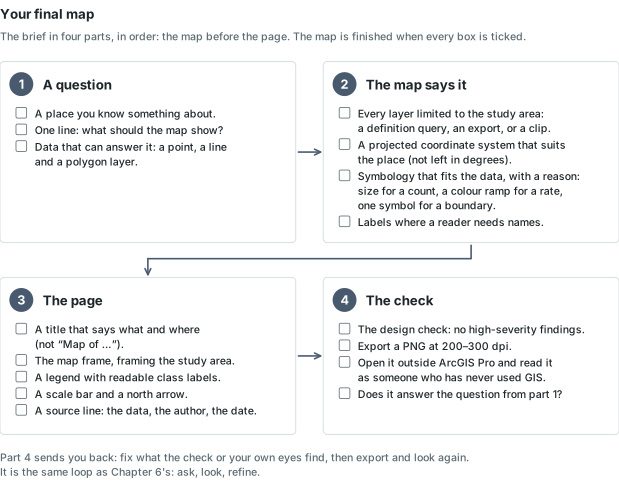
The order of the work is important. Finish the map before you start the page. National or continental layers added straight from a service cover far more than the study area; limit each layer to the place with a definition query, an exported selection or a clip (Chapters 4, 6 and 7). A map made from ArcGIS Pro's Map template starts in Web Mercator, a projected system that is fine for looking at a state or a county; if the map measures anything, or asks the reader to compare areas by eye, give it a projection chosen for the place (Chapter 3). A map that started empty takes its coordinate system from the first layer added, which is often latitude and longitude, and everything on it looks stretched; give that map a single projected coordinate system that suits the place, chosen for a reason (Chapter 3). The map's coordinate system reprojects the layers on the fly, so nothing needs to be rewritten on disk. Then choose symbology that fits the data, for a reason you could explain (a size for a count, a colour ramp for a rate, one symbol for a boundary), and add labels only where a reader needs names.
Only then make the page: a title that states what and where (the words "Map of" at the start of a title add no information), the map frame, a legend, a scale bar and a north arrow, and a small source line with the data, the author and the date (Chapter 4). A layout started from a template includes its own map frame, linked to the template's own map; set the frame to show your map before you do anything else.
Then run the check. Waldo's design check measures what can be measured on the layout: whether the frame fits the study area, whether text is large enough to read, contrast, overlaps and margins. Resolving any high-severity finding is part of the brief; the other findings are suggestions. Export the layout as a PNG at 200 to 300 dpi, open the file outside ArcGIS Pro, and look at it as someone who has never used GIS would. The last box on the checklist is the question you started with: does the picture answer it? If it does not, return to the map. Add one line about what no check can measure: why these data and this method fit the question, and what the map does not show. This is the cycle of asking, looking and refining from Chapter 6, applied one last time to your own work.
Rule of thumb
Make the map answer the question before you make the page, and judge the page by the exported image rather than by the layout view.
Where to make it
You can use any place, and the lesson offers the ones the course has already visited, each with a point, a line and a polygon layer registered and ready to add. Working in a place you already know saves searching for data and makes the question the new part of the work.
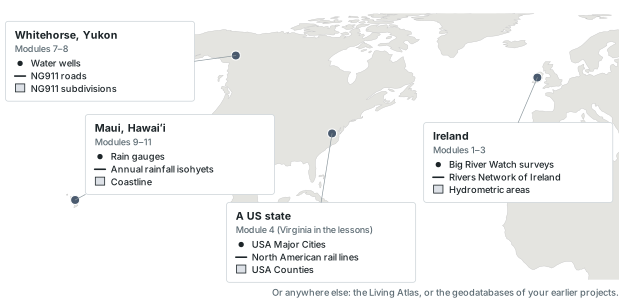
A good question is one line that a map can answer: where the rain falls on Maui, which Virginia counties the railways miss, where Whitehorse's deep wells are. The question determines which layers are needed, which one is shown by colour and what the title says. The same data can support many maps, and the question determines which one you make.
In the pane
Module 11 lesson 3 opens with the places menu and asks for your place and question in one line. After that you make the decisions: Waldo reminds you how anything was done and names the lesson that taught it. Each time you say "check my work", it checks the whole brief in one pass (your layers, coordinate system and layout, its design check, the PNG) and names anything still missing with where to find it; it does not move you on to the export while a part of the page is missing or a high-severity finding is open. It never builds the map for you. If the model in use can see pictures, it can also review the exported PNG itself, as suggestions, never a grade.
Try it
In any course project with a map open, ask Waldo in Ask mode: if I made this map into a local scene, which of my layers could I extrude, and by what? Waldo reads the layers and their fields and says which have a height, a count or neither. Compare its answer with the rules of thumb in this chapter.
Key terms
- scene
- a map drawn in three dimensions, with a ground surface, flat layers draped on it and features that can stand up from it.
- global scene
- a scene of the whole round Earth, for large areas where the Earth's curvature matters.
- local scene
- a scene of a flat piece of the world in a projected coordinate system, for a site, a town or a mountain.
- ground
- the elevation surface a scene stands on, built from one or more DEMs.
- vertical exaggeration
- a factor that multiplies every height of the ground; 2 doubles the relief, 1 shows it true.
- camera pitch
- how far a scene's camera looks down from the horizon: −90° straight down, 0° level.
- heading
- the compass direction a scene's camera faces, counted clockwise from north: 0° north, 90° east, 180° south, 270° west.
- orbit
- moving a scene's camera in a circle round a point while it keeps facing the point.
- draping
- drawing a flat layer on the ground surface of a scene, so that it follows the terrain.
- extrusion
- drawing each feature pushed up by a height into a solid (point to column, line to wall, polygon to block); a display setting, not a change to the data.
- Max Height
- the extrusion type that puts a flat top at the given height above the highest ground under each feature.
- 2D Layers / 3D Layers
- the headings a scene's Contents sorts layers under: flat layers drawn on the ground, and layers that stand up from it.
- study area
- the place a map is about; the data on the map is limited to it.
- source line
- the small text on a finished layout naming the data, the author and the date.
Further reading
- Esri. "Extrude features to 3D symbology." ArcGIS Pro documentation. https://doc.esri.com/en/arcgis-pro/latest/help/mapping/layer-properties/extrude-features-to-3d-symbology.html (src:esri-pro-docs)
- Esri. "Author and share a local scene," the Get Started tutorial the lecture's scene exercise follows. ArcGIS Pro documentation. https://pro.arcgis.com/en/pro-app/latest/get-started/author-and-share-a-local-scene.htm (src:esri-pro-docs)
- Harder, C., & Brown, C. (eds.) (2017). The ArcGIS Book, the chapter on 3D. Esri Press. https://learn.arcgis.com/en/arcgis-book/ (src:esri-arcgis-book)
- The course's data sources: the State of Hawaii's copy of the USGS 10 m DEM, USA Structures and every layer on the places menu, each with its publisher and licence. (src:course-data-sources)