Chapter 4
Cartographic design
Accompanies Module 4 · Cartographic Design
Why this matters
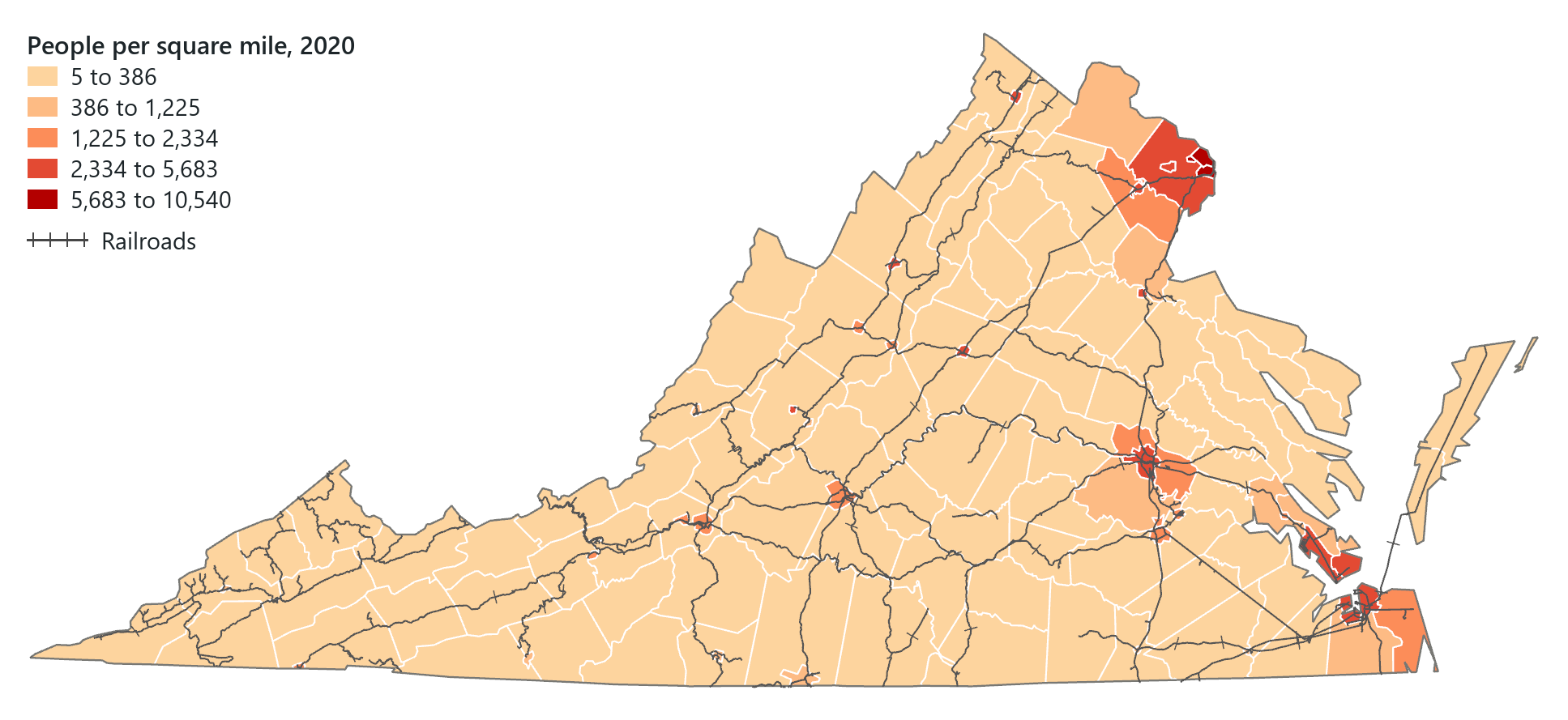
A map can be correct and still mislead its readers or fail to be read. Every map leaves out most of the world, and the choices of symbol, colour, classes, lettering and layout determine what a reader learns from it. The map above shows Virginia's 133 counties and independent cities by people per square mile, a rate, in five classes of one hue. This chapter explains each of those choices and the reasoning behind it.
You should be able to explain
- why a choropleth of counts mostly maps the size of the areas, and what a rate shows instead
- why the same data can tell a different story under a different classification method
- why size, weight and value suit amounts while hue and shape suit kinds of thing
Every map is generalized
A map is a representation of geographic data that communicates a point of view. Cartography is the art and science of designing maps, and the cartographer's decisions determine what a reader can learn from a map. The real world is far too detailed to show in full, so a map leaves some things out and simplifies and groups others, so that the important features can be seen. The geographer Mark Monmonier called the result a set of "white lies" told in the reader's interest.
This process is called generalization: selecting, organizing and transforming geographic information into a form that can be mapped at a given scale and for a given purpose. Its operations are selection (what to include), simplification (simpler shapes for the scale), classification (grouping features by a measured attribute) and symbolization (turning information into graphic marks). Classification and symbolization take up most of this chapter.
The U.S. Census Bureau publishes the same state boundaries generalized for three display scales, as cartographic boundary files at 1:500,000, 1:5,000,000 and 1:20,000,000. Virginia's outline has 326 points in the smallest-scale file and 5,933 in the largest.
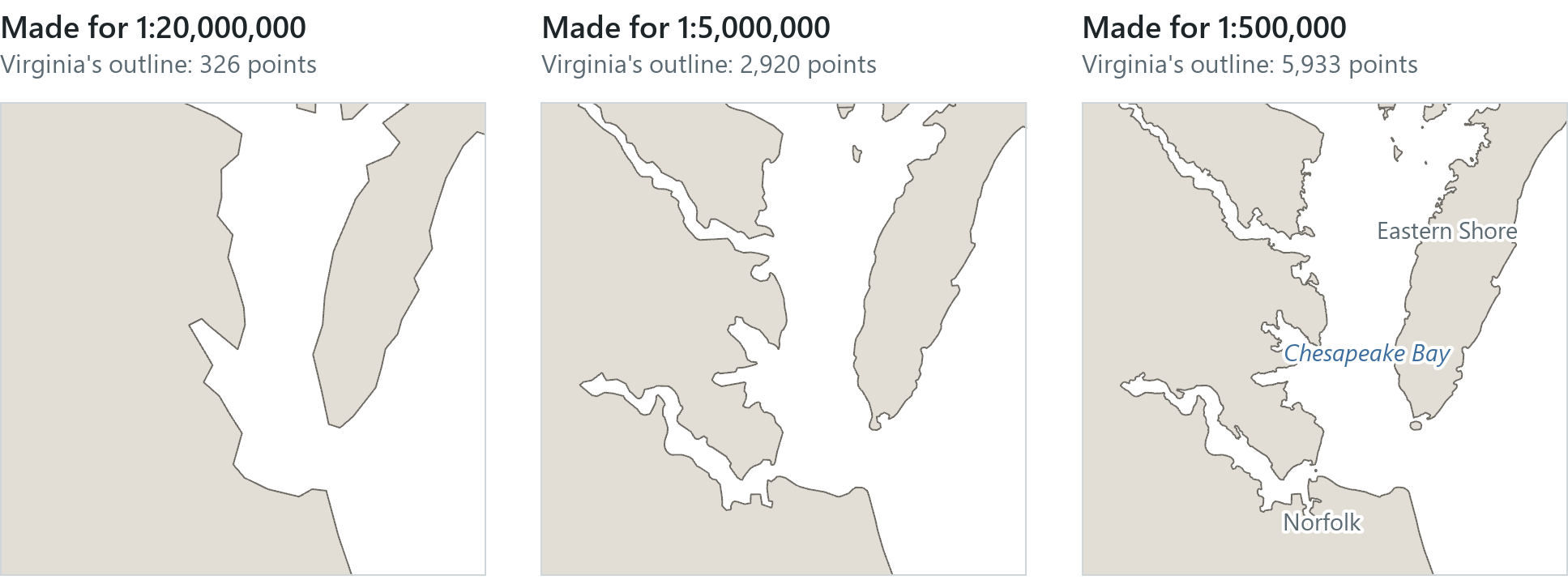
At a small scale, detail that cannot be seen only adds clutter, and a boundary simplified for a national map looks angular when viewed close up. The county layer used in Module 4 is itself generalized (Accomack County, on the Eastern Shore, is drawn with 36 points), so it draws quickly for the whole country.
Reference and thematic maps
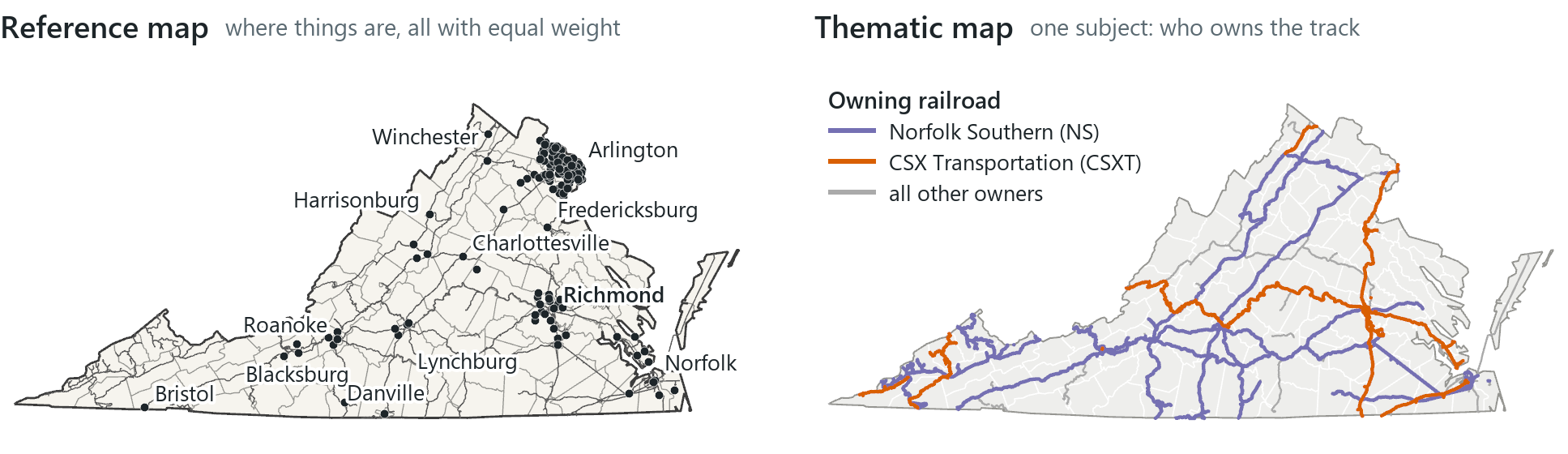
A reference map shows where things are, natural and human-made, with many features at roughly equal weight: a street map, a topographic map, a basemap. It serves many purposes. A thematic map has one subject, such as population density or disease rates, and one purpose; the other features on it provide context. Every map made in Module 4 is thematic.
The second decision is what kind of attribute is being shown. A qualitative attribute distinguishes kinds of things; a quantitative attribute measures an amount.
| Layer (Virginia) | Qualitative attributes | Quantitative attributes |
|---|---|---|
| Counties (133) | NAME, FIPS code | POPULATION, SQMI, POP_SQMI |
| Places (129) | NAME, CLASS (city, town, Census Designated Place) | POPULATION |
| Railroad segments (5,176) | owning company (RROWNER1) | MILES |
The categories depend on the state. The USA Major Cities layer holds places of 10,000 people or more plus the state capitals, so Virginia's places fall into three classes while a state such as Idaho has only one, city. A map with one class is still a correct map of that attribute, but it shows no differences between the features.
A code made of digits, such as a FIPS code, is still qualitative, because it serves as a label rather than measuring an amount. Of Virginia's 5,176 rail segments (about 4,306 miles), Norfolk Southern owns 2,699 and CSX Transportation 1,658; the thematic map above shows this ownership.
Visual variables
Map symbols are points, lines and areas, and each is designed by adjusting a small number of graphic properties. These properties are the visual variables, the characteristics of a mark that the eye perceives as a difference; the idea is usually traced to the French cartographer Jacques Bertin in 1967.
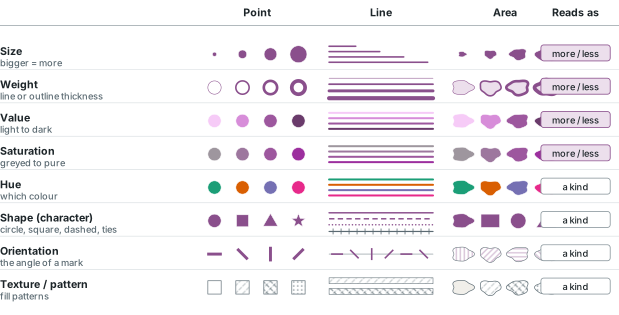
The variables fall into two groups according to what the eye perceives from them. Size, weight (the thickness of a line or outline) and value (light versus dark) read as order, so they suit amounts. Hue and shape (the character of a symbol: circle versus square, solid versus dashed, a plain line versus one with ties) read as differences in kind, so they suit categories. A real symbol usually combines several variables: the gallery's Railroad symbol in ArcGIS Pro is two layers, a grey stroke and a marker (the ties) repeated along the line.
Rule of thumb
Match the variable to the attribute. Use size, weight or value for amounts and hue or shape for kinds. A rainbow of hues for a count, or different sizes for categories, makes the symbols harder for the reader to interpret.
In the pane
Module 4 lesson 1 builds a new project with three Living Atlas layers (counties, major cities and the rail network), each filtered to one state by a definition query, and compares reference and thematic maps. Lesson 2 reads qualitative and quantitative columns from the counties table, shows the visual variables and gives each layer a single symbol, the railroads the gallery Railroad symbol.
Colour
Colour has three dimensions. Hue is which colour it is (red, blue). Saturation is how pure or greyed it is. Value is how light or dark it is. Screens mix red, green and blue light, and Pro's colour picker shows hue, saturation and value beside the RGB numbers.
Schemes for data come in three families. A qualitative scheme uses distinct hues of similar value, for categories. A sequential scheme runs from light to dark, in one hue or a few neighbouring ones, for amounts: the order of lightness represents the order of the values, and darker colours are read as larger amounts. A diverging scheme joins two sequential ramps at a pale middle, for amounts with a meaningful midpoint such as zero change or an average.
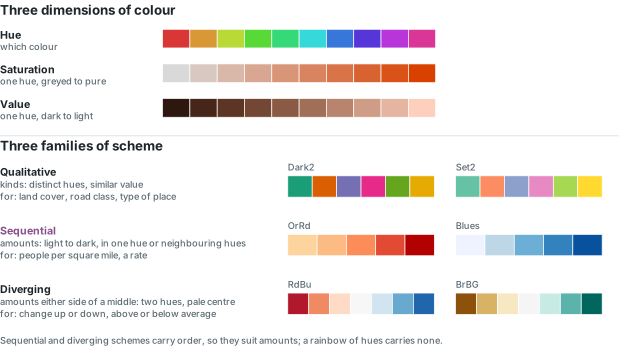
ColorBrewer, by Cynthia Brewer and Mark Harrower at Penn State, is a widely used source of tested schemes, and Pro's colour ramps include many of them. A choropleth usually needs three to five classes in one ordered scheme; one hue from light to dark is a reliable first choice, and beyond about seven classes the eye cannot separate them. If a scheme's lightest class is white, the lowest class is hard to see between white borders, so choose one that starts at a tint. Also check whether the scheme suits readers with colour-vision deficiency; ColorBrewer marks this for each scheme, because not every scheme stays distinct at every class count. Earth tones usually look better than strident colours, and emphasis comes from colour, size and line width.
Thematic map types
Each symbology type in Pro represents one attribute with one visual variable. The Primary symbology menu lists them in order: Single Symbol, Unique Values, then the quantity types Graduated Colors, Bivariate Colors, Unclassed Colors, Graduated Symbols and Proportional Symbols, and further down Dot Density, Charts and Heat Map.
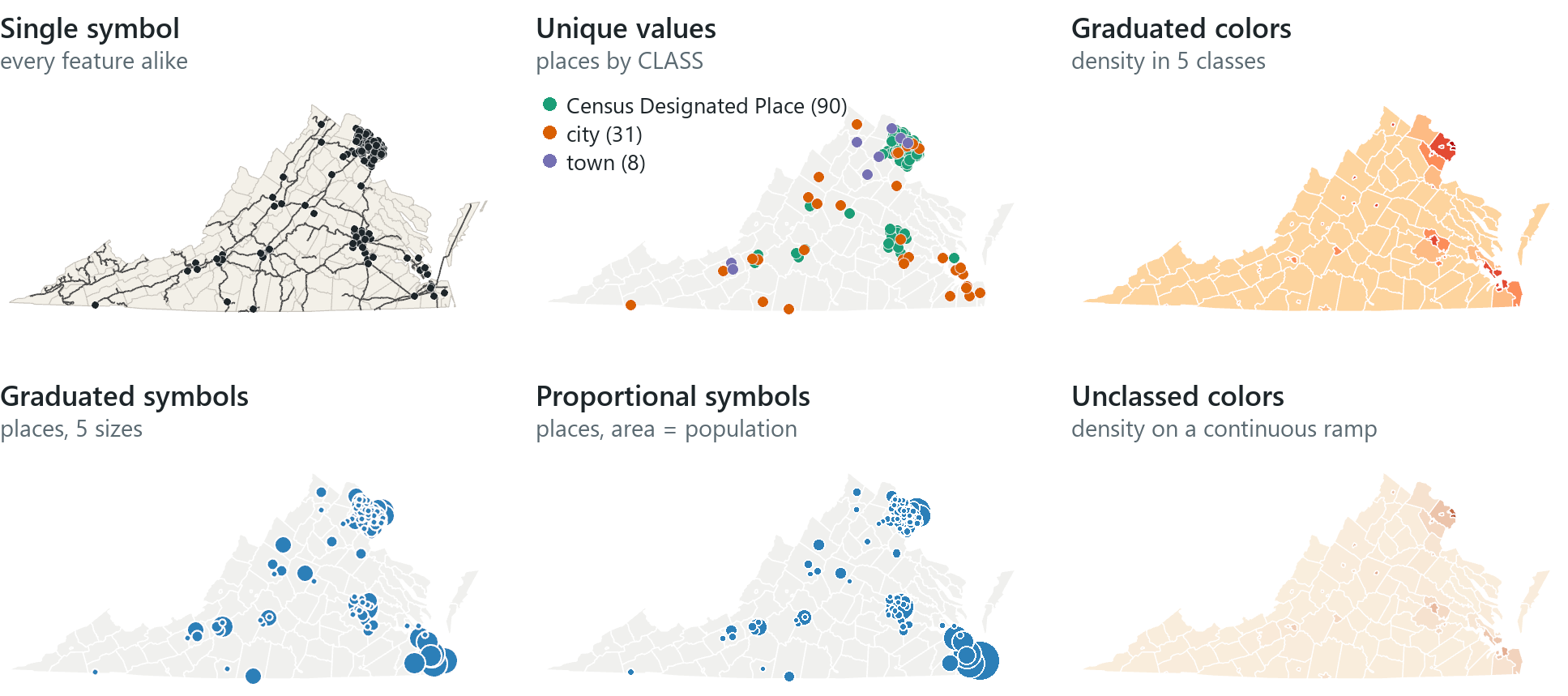
- Single symbol draws every feature alike; labels distinguish them.
- Unique values gives each category its own symbol, usually its own hue.
- Classed types sort values into a few classes first: graduated colors (the choropleth map of shaded areas), graduated symbols and bivariate colors.
- Unclassed types do not use classes: unclassed colors, proportional symbols (each symbol sized in proportion to its value) and dot density.
Contour lines are used for surfaces and are covered with rasters in Module 8. Virginia's largest place in the USA Major Cities layer is Virginia Beach, with 459,470 people; on the graduated-symbol map it falls in the top class, which starts above 186,247.
Counts and rates
Colouring areas by a count, such as total population, mostly shows how large each area is, because a large county tends to contain more of most things and the eye responds to the area rather than to the number. A rate divides the count by the area or by another count, so it describes the area regardless of its size. Pro's normalization option divides one field by another on the fly.
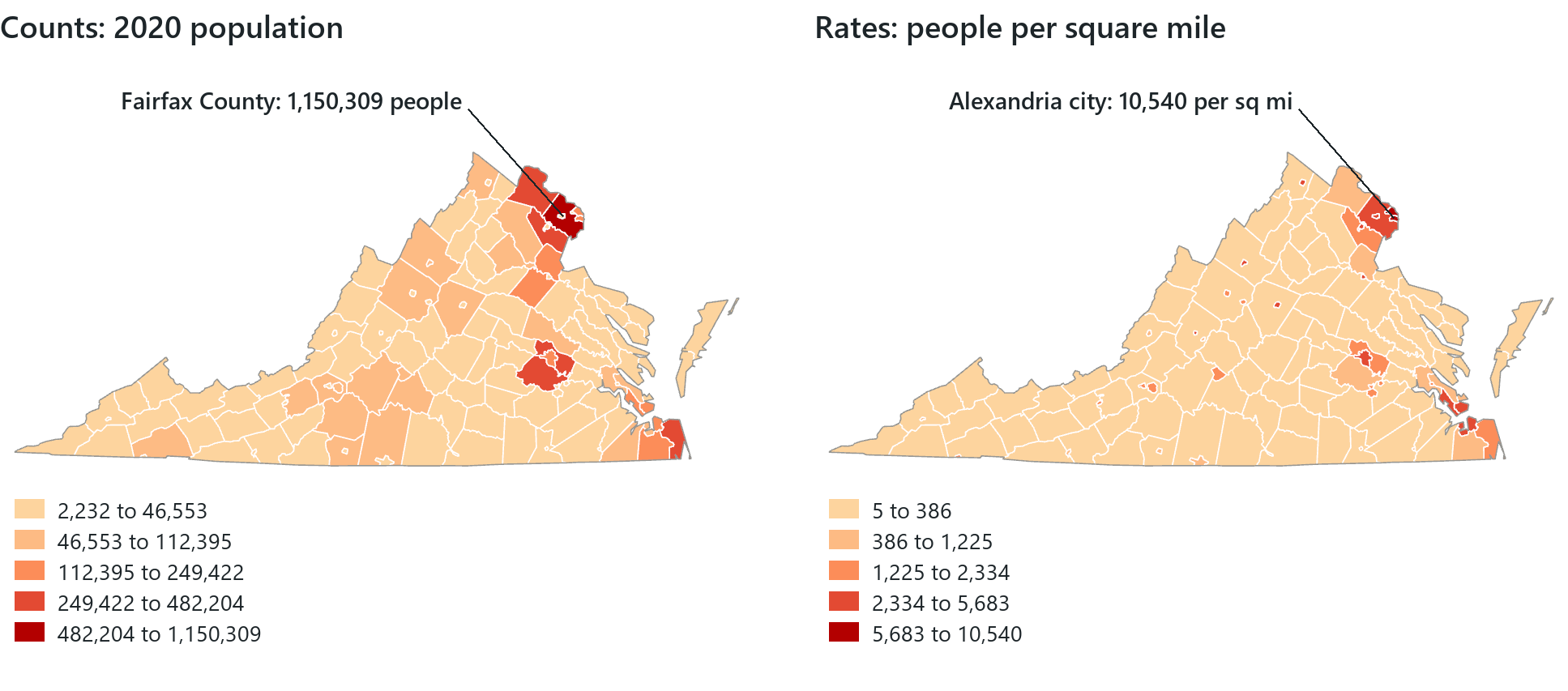
In Virginia, Fairfax County (397 square miles) has the highest population and Alexandria city the highest people per square mile. The two maps show different things about the same state. The rate map compares how crowded the counties are. The count is also a legitimate question (how many people live here?), and proportional symbols show it without letting the size of each area stand in for the amount. The denominator must match the question: people per square mile, cases per person and the share of households measure three different things.
The shade of an area represents an average over the whole area; it does not mean that people are spread evenly inside it. If the boundaries are redrawn, for example counties into districts or tracts into counties, the pattern can change; geographers call this the modifiable areal unit problem. What is true of an area on average need not be true of the people in it, and assuming otherwise is the ecological fallacy: a county with a high rate contains many people to whom the rate does not apply.
Rule of thumb
On a map of areas, map rates rather than counts. Areas shaded by a count mostly show the size of each area; if the count itself matters, use proportional symbols instead.
Classification
Classification groups features into a small number of classes by their attribute values and a stated method. The method affects both the appearance of the map and the conclusions it appears to support, so examine the numbers before relying on the map.
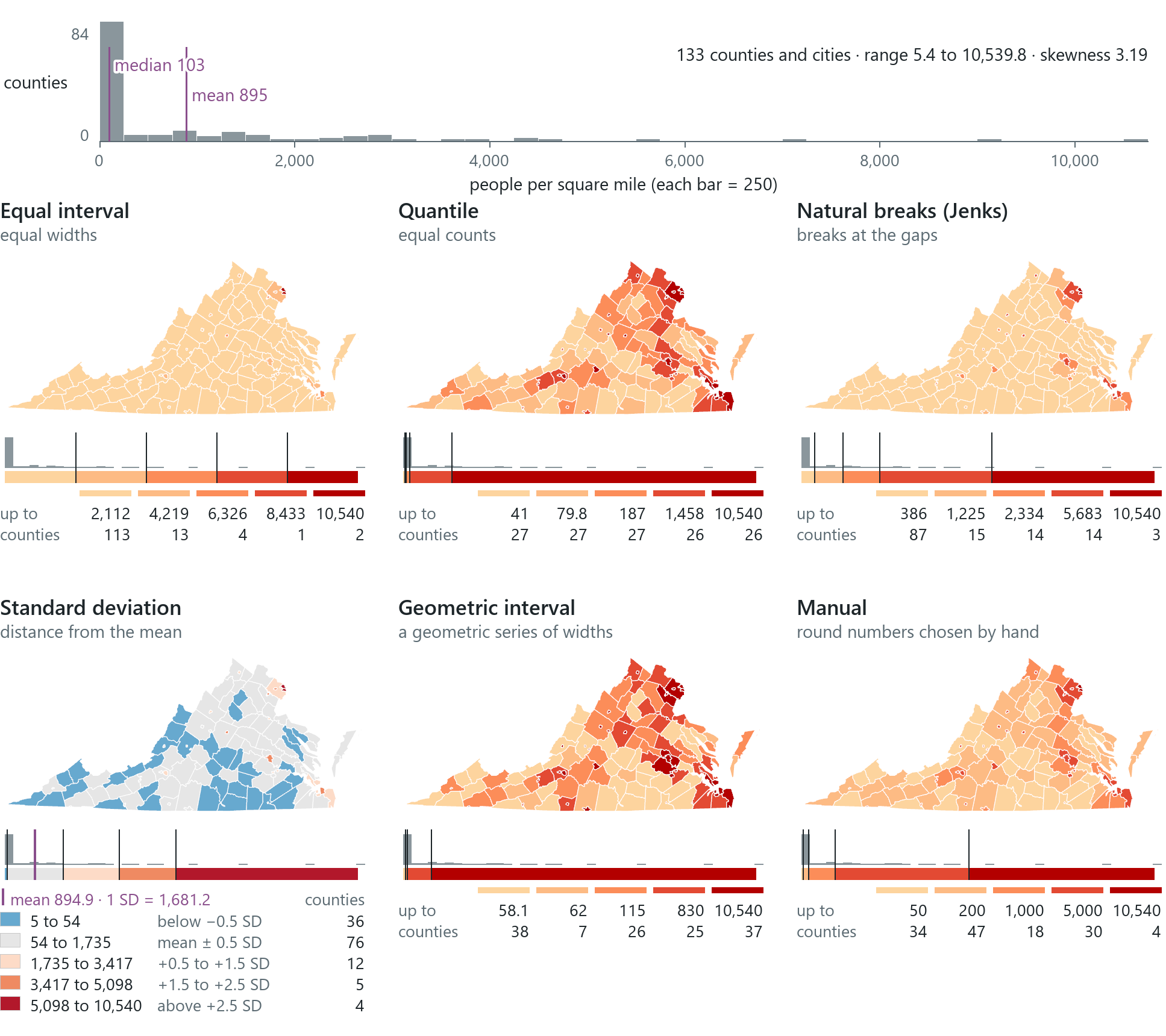
Classification starts with a histogram, a chart of how many features have each value; Pro's Symbology pane has one on its Histogram tab. Data can be normal (a symmetric bell), uniform (flat), skewed (piled at one end with a long tail) or multi-modal. Virginia's 133 people-per-square-mile values run from 5.4 (Highland County) to 10,539.8 (Alexandria city). The median is 102.6, the mean 894.9, and 84 of the 133 are below 250, so the distribution is strongly right-skewed. The standard deviation, 1,681.2 here, measures how spread out the values are around the mean; in a normal distribution about 68 % of values lie within one standard deviation of the mean.
| Method | How it cuts | Suits | Watch for |
|---|---|---|---|
| Equal interval | equal-width classes across the range | familiar ranges (percentages, temperature); general readers | clustered data lands in one class |
| Quantile | the same number of features per class | ranks ("the top fifth"); evenly spread data | alike values split, very different values share a class |
| Natural breaks (Jenks) | breaks where the data thin out | most data; Pro's default for graduated renderers | breaks fit one dataset, so two maps are hard to compare |
| Standard deviation | distance from the mean | bell-shaped data | the legend shows deviations, not values |
| Geometric interval | class widths follow a geometric series, which Pro may reverse once to fit the data | a compromise for continuous data | hard to explain |
| Manual | breaks chosen by hand | an outside standard, round numbers | check the histogram so no class is empty |
The equal-interval map places 113 of the 133 in its lightest class, so it shows almost no variation. Quantile puts the same number of features in every class but shows most of the state in dark colours. Pro's natural breaks for these values are 386, 1,225, 2,334 and 5,683 people per square mile. The geometric-interval map's second class is only 4 people per square mile wide (58 to 62). This narrow class results from the series fitting a long tail; it is not an error, but it is hard to explain to a reader. The manual map uses breaks of 50, 200, 1,000 and 5,000.
Rule of thumb
Use natural breaks by default; use quantile when the reader thinks in ranks, and geometric interval only on request. Keep to three to five classes, read the histogram first, and state which method the map uses.
In the pane
Module 4 lesson 3 puts unique values on the cities' class (as many classes as your state has), covers the three scheme families and the symbology menu, shows that Fairfax has the highest count and Alexandria the highest rate, and shades the counties by people per square mile. Lesson 4 opens the Histogram tab, applies equal interval, quantile and natural breaks in turn, reads their class breaks, and asks you to choose a method and give a reason.
Typography and labels
Text on a map is also a symbol. Type varies in weight (light to heavy), posture (roman or italic), width and case (capitals or mixed case). Legibility is whether the text can be read; harmony means using one or two typefaces and varying them rather than mixing many. Choose the typeface deliberately, because the default text font can differ from one computer to another, and a page built on defaults can end up with three typefaces that nobody selected.
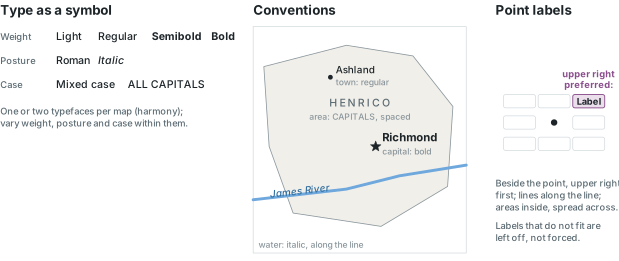
Map readers are familiar with a set of conventions: water features in italic, land features in roman; area features in capitals (FRANCE), point and line features in mixed case; bold for importance, such as a capital city. Point labels are placed beside the point, preferably at the upper right; line labels run along the line; area labels are placed inside the area and spread across it.
A map can carry two kinds of text. Graphic text (the title, a note) is not tied to features. Labels are tied to features: dynamic labels are placed automatically from a field for every feature and re-placed at each zoom, while annotation is text placed and stored piece by piece. Pro omits duplicate and overlapping labels; forcing every label onto the map makes it unreadable. A halo, a thin light outline around letters, separates text from a busy background.
Rule of thumb
Give a halo to one label layer per map at most. Capitalize area names through the label expression (such as Upper($feature.NAME) in Arcade), never by editing the data.
In the pane
Module 4 lesson 5 separates graphic text from labels and dynamic labels from annotation, then labels the cities and the counties in one typeface, Tahoma, the counties in capitals through an expression. The railroads are deliberately left unlabelled, and only one layer gets a halo.
Map elements and the layout
A finished map includes more than the map body. A layout is a fixed-size page; a map frame places the map on it, and the other elements give the reader the information needed to interpret the map:
- Title: what the map shows, usually without the word "map".
- Legend: how to read the symbols; its symbols must match the map exactly.
- Scale: a bar, verbal scale or representative fraction; required on large-scale maps and any map meant for measuring.
- North arrow: required when north is not up; placed together with the scale bar.
- Source and date of the data, the cartographer or agency, the date made, and the projection when it matters.
- Optional: a neatline enclosing the set, a locator or inset map, explanatory text.
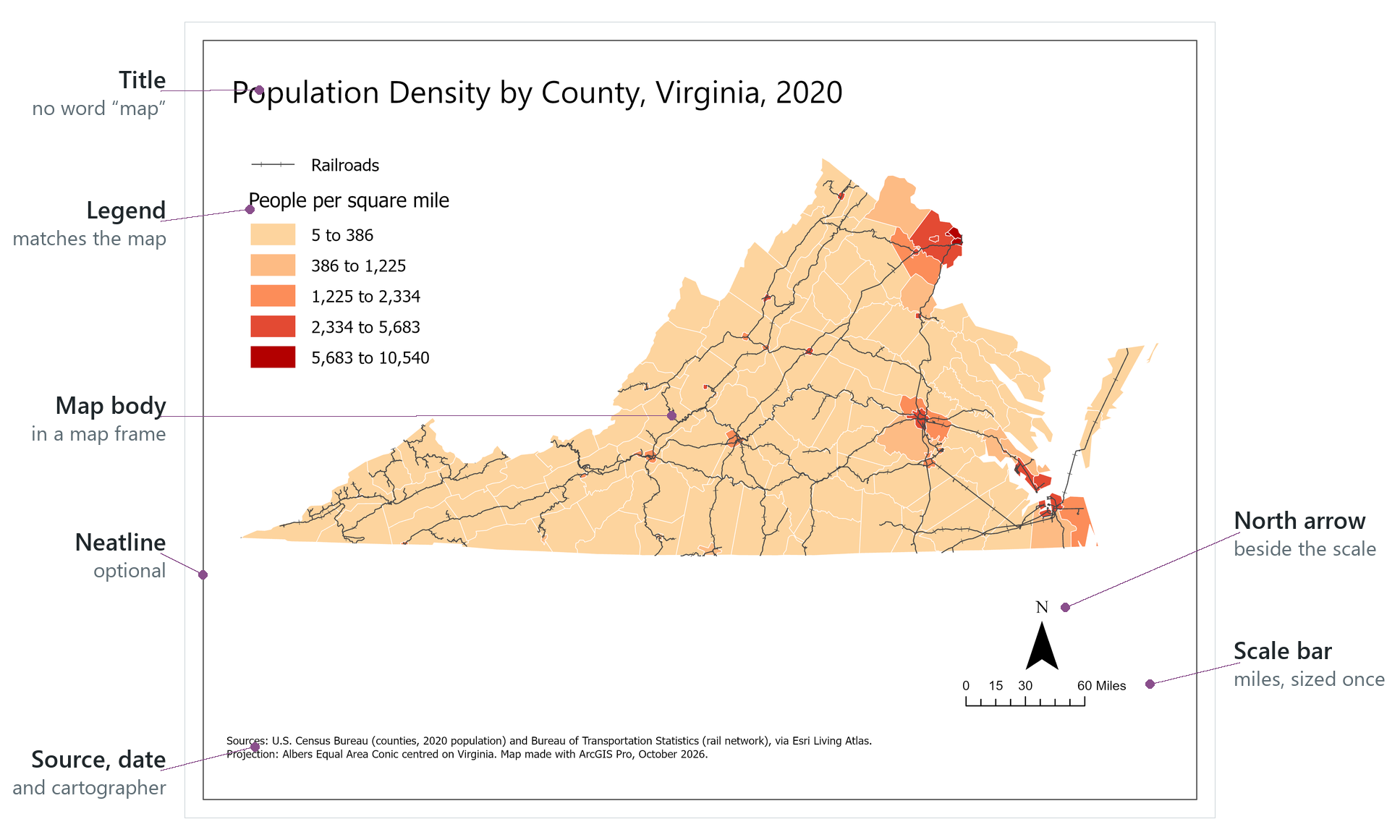
Legend entries follow the order of the Contents pane, so points, lines and polygons listed in that order give a legend in that order. The scale bar is sized once, in units the reader uses (miles, in Virginia).
In the pane
Module 4 lesson 6 builds a layout one element at a time, on a portrait or landscape page chosen from the shape of your state: the map frame, a bold title in the same typeface as the labels, a legend, a scale bar in miles with the north arrow beside it, and a source line, then exports it as an image.
Design principles
Layout design follows a few general practices. Choose the page orientation to fit the area: landscape for a state wider than it is tall, such as Virginia or Tennessee, portrait for one taller than wide, such as Idaho or California. Make the map body as large as the page allows. Put the focal element near the optical centre, a little above the geometric centre, where the eye tends to look first. Balance the elements so that no area is empty or crowded, and align their edges. Build a visual hierarchy so that the most important elements are the most prominent: the title, the map and the legend, then the fine print.
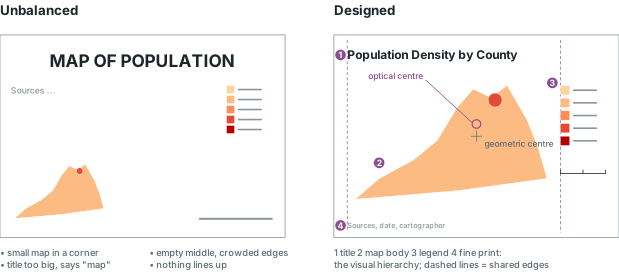
Figure-ground is the contrast that lets the reader separate the subject (the figure) from its background (the ground). It comes from colour (hue, value, saturation, warm against cool), size, texture, and effects such as a glow. In practice this usually means a muted basemap, such as a light grey canvas, so that the coloured counties stand out.
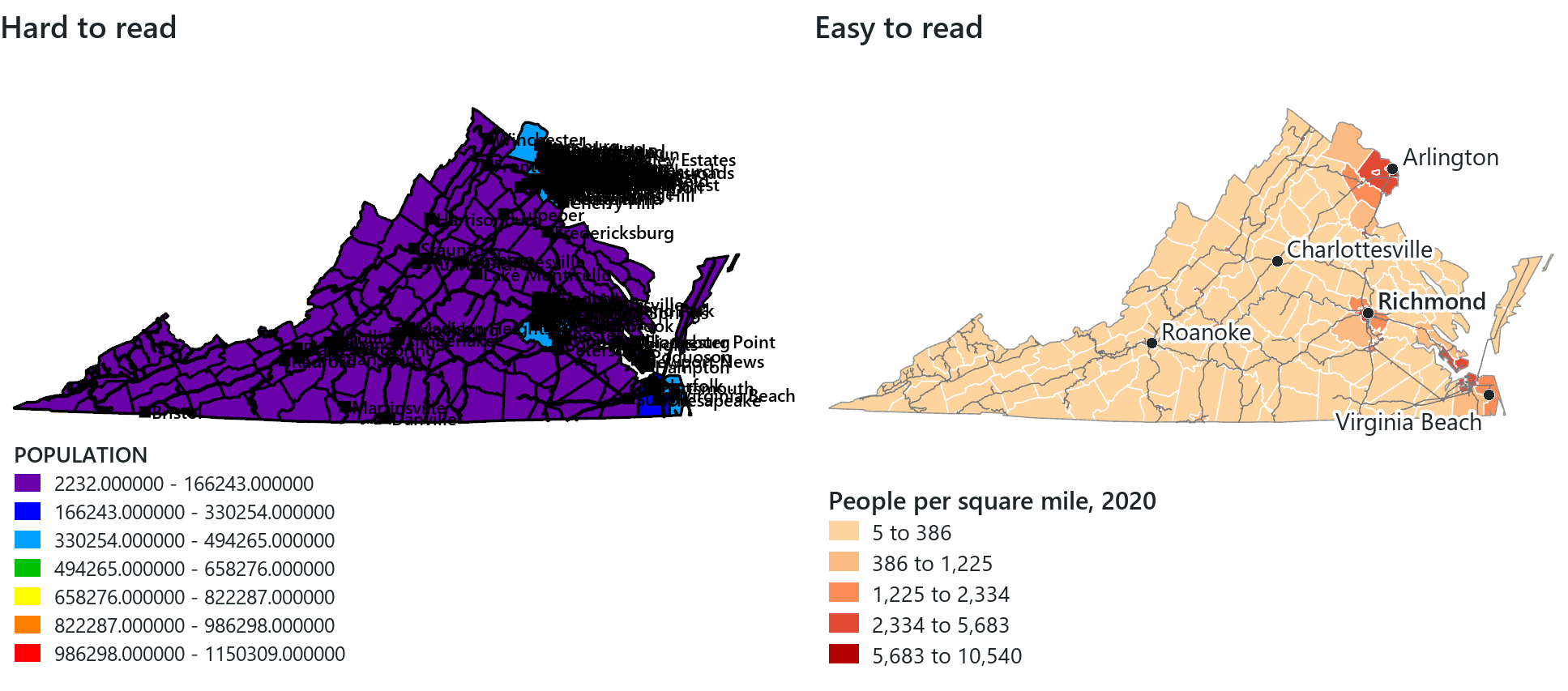
An ugly map with crude colours and careless lettering may be as accurate as a beautiful one, but readers are less likely to trust it; the geographer John K. Wright made the point in 1944. Design therefore affects whether a correct map is also convincing. Some aspects of design can be checked by software (text size, contrast between classes, elements that overlap or run off the page), but a check that finds no problems does not show that a map is well designed; the rest has to be checked by looking at the map.
In the pane
Module 4 lesson 7 covers the design habits and figure-ground, switches to a quiet Light Gray Canvas basemap, and runs Waldo's design check on your layout, fixing what it finds until no high-priority finding remains, before exporting a second version.
Try it
With your Module 4 layout open, ask Waldo in Ask mode: which classification method is my county layer using, and how many counties are in each class? Compare the answer with the histogram, and decide whether the method suits your data.
Key terms
- cartography
- the art and science of designing maps.
- generalization
- selecting, simplifying, classifying and symbolizing geographic information so it can be shown at a given scale and for a given purpose.
- reference map
- a map of where things are, with many features at roughly equal weight, for many purposes.
- thematic map
- a map of one subject for one purpose, with everything else as context.
- qualitative attribute
- an attribute that tells kinds of things apart: a category, a name, a code.
- quantitative attribute
- an attribute that measures an amount: a count, an area, a rate, a percentage.
- visual variable
- a graphic property of a symbol, such as size, weight, shape, orientation, texture, hue, value or saturation, that the eye reads as a difference.
- hue / saturation / value
- which colour; how pure versus greyed; how light or dark.
- qualitative / sequential / diverging scheme
- distinct hues for categories; an ordered light-to-dark run for amounts; two hues meeting at a pale middle for amounts with a meaningful midpoint.
- choropleth map
- a map of areas shaded by class of a rate or proportion (Graduated Colors in Pro).
- graduated / proportional symbols
- point symbols sized by class; point symbols sized in exact proportion to each value.
- normalization
- dividing a count by another field, such as area or population, to make a rate.
- modifiable areal unit problem
- the way a mapped pattern can change when the same data are summarized over differently drawn areas.
- ecological fallacy
- the mistake of assuming that what is true of an area on average is true of the individuals in it.
- classification
- grouping features into a few classes by attribute value, with a stated method.
- histogram
- a chart of how many features have each value.
- skewed distribution
- values piled at one end with a long tail at the other.
- natural breaks (Jenks)
- a classification method that places breaks where the data thin out, keeping each class's values alike.
- quantile
- a classification method that puts the same number of features in every class.
- equal interval
- a classification method that divides the range into classes of equal width.
- legibility / harmony
- whether text can be read; one or two typefaces used consistently.
- dynamic label / annotation
- text placed automatically from a field; text placed and stored piece by piece.
- halo
- a light outline around lettering that separates it from a busy background.
- layout
- a fixed-size page holding map frames and map elements.
- neatline
- an optional line enclosing the map or the whole layout.
- optical centre
- the point a little above the geometric centre of a page where the eye first lands.
- visual hierarchy
- design that makes the most important elements the most prominent.
- figure-ground
- the contrast that separates a map's subject from its background.
Further reading
- Brewer, C. A., Harrower, M., & The Pennsylvania State University. ColorBrewer 2.0: colour advice for maps. https://colorbrewer2.org/ (src:colorbrewer)
- Ingram, U., & Rhodes, J. Introduction to Cartography (KSU). GALILEO Open Learning Materials. https://oer.galileo.usg.edu/geo-textbooks/3 (src:ingram-rhodes-cartography)
- Schlosser, S. (2024). Making Effective Maps: Cartographic Visualization for GIS. University of Colorado Boulder. https://colorado.pressbooks.pub/makingmaps/ (src:schlosser-effective-maps)
- Axis Maps. Cartography Guide. https://www.axismaps.com/guide (src:axis-cartography-guide)
- DiBiase, D., et al. The Nature of Geographic Information. Penn State. https://www.e-education.psu.edu/natureofgeoinfo/ (src:psu-nature-geoinfo)
- Monmonier, M. (1996). How to Lie with Maps (2nd ed.). University of Chicago Press; 3rd ed. 2018. (src:monmonier-lie-with-maps)
- Slocum, T. A., McMaster, R. B., Kessler, F. C., & Howard, H. H. Thematic Cartography and Geovisualization. Pearson / CRC Press. (src:slocum-thematic)
- U.S. Census Bureau. Cartographic Boundary Files: the generalized boundaries behind this chapter's generalization figure. https://www.census.gov/geographies/mapping-files/time-series/geo/cartographic-boundary.html (src:census-cartographic-boundaries)
- Esri. ArcGIS Pro documentation: the data classification methods page. https://pro.arcgis.com/ (src:esri-pro-docs)
- The course's data sources: every layer the lessons and this chapter's maps use, with its publisher and licence. (src:course-data-sources)